)




added 10 additional animating textures.
Error: File read failure
Kod:
hlcsg 3.4 SSE 2 V2.0 (Mar 29 2009)

Zoner's Half-Life Compilation Tools -- Custom Build

Based on code modifications by Sean 'Zoner' Cavanaugh

Based on Valve's version, modified with permission.

Submit detailed bug reports to ([email protected])

-----  BEGIN  hlcsg -----

Command line: D:\serhatinkiler\klasor\hlcsg.exe d:\serhat\yeni -nowadtextures

Entering d:\serhat\yeni.map


Current hlcsg Settings

Name                 |  Setting  |  Default

---------------------|-----------|-------------------------

threads               [       6 ] [  Varies ]

verbose               [     off ] [     off ]

log                   [      on ] [      on ]

developer             [       0 ] [       0 ]

chart                 [     off ] [     off ]

estimate              [     off ] [     off ]

max texture memory    [ 4194304 ] [ 4194304 ]

max lighting memory   [ 6291456 ] [ 6291456 ]

priority              [  Normal ] [  Normal ]


noclip                [     off ] [     off ]

null texture stripping[      on ] [      on ]

clipnode economy mode [      on ] [      on ]

clip hull type        [  legacy ] [  legacy ]

onlyents              [     off ] [     off ]

wadtextures           [     off ] [      on ]

skyclip               [      on ] [      on ]

hullfile              [    None ] [    None ]

nullfile              [    None ] [    None ]

min surface area      [   0.500 ] [   0.500 ]

brush union threshold [   0.000 ] [   0.000 ]


Using mapfile wad configuration

Wadinclude list :

[zhlt.wad]


7 brushes (totalling 42 sides) discarded from clipping hulls

CreateBrush:

 (0.25 seconds)

SetModelCenters:

 (0.00 seconds)

CSGBrush:

 (0.63 seconds)


Using Wadfile: \cs16_oynucaz2017\cs16_oynucaz2017\cstrike\cstrike.wad

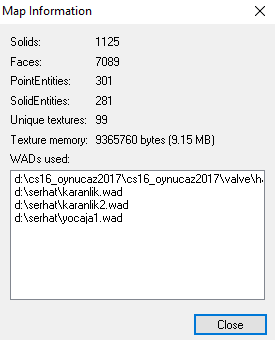
 - Contains 0 used textures, 0.00 percent of map (123 textures in wad)

Using Wadfile: \cs16_oynucaz2017\cs16_oynucaz2017\valve\halflife.wad

 - Contains 14 used textures, 14.00 percent of map (3116 textures in wad)

Using Wadfile: \serhat\yocaja1.wad

 - Warning: Larger than expected texture (348972 bytes): '!ALEW'

 - Warning: Larger than expected texture (348972 bytes): '!LAVA01'

 - Warning: Larger than expected texture (359852 bytes): 'ISYAN'

 - Warning: Larger than expected texture (235412 bytes): 'GENERALL'

 - Warning: Larger than expected texture (200732 bytes): 'ROOF9'

 - Warning: Larger than expected texture (348972 bytes): 'MAKEMEAT_LOGO'

 - Warning: Larger than expected texture (348972 bytes): 'SNOWWALL'

 - Warning: Larger than expected texture (348972 bytes): 'SNOW32'

 - Warning: Larger than expected texture (348972 bytes): 'REKLAMREDARMY'

 - Warning: Larger than expected texture (348972 bytes): '+0REDARMY'

 - Warning: Larger than expected texture (348972 bytes): '+1REDARMY'

 - Warning: Larger than expected texture (348972 bytes): '+2REDARMY'

 - Warning: Larger than expected texture (348972 bytes): '3_BLACKFADE_L'

 - Warning: Larger than expected texture (348972 bytes): '3_FLOOR1'

 - Warning: Larger than expected texture (348972 bytes): '3_FLOOR2'

 - Warning: Larger than expected texture (348972 bytes): '3_FLOOR3'

 - Warning: Larger than expected texture (348972 bytes): '3_NAMEWALL'

 - Warning: Larger than expected texture (348972 bytes): '3_WALL2'

 - Warning: Larger than expected texture (348972 bytes): '3_WALL5'

 - Warning: Larger than expected texture (348972 bytes): '3_WARNING'

 - Warning: Larger than expected texture (348972 bytes): 'OASIS_CREDITS_1'

 - Warning: Larger than expected texture (348972 bytes): 'OASIS_CREDITS_2'

 - Warning: Larger than expected texture (348972 bytes): 'SNOW1'

 - Warning: Larger than expected texture (348972 bytes): 'SNOWWALL1'

 - Warning: Larger than expected texture (255132 bytes): 'YILBASI_YER'

 - Warning: Larger than expected texture (918812 bytes): 'AJAN8'

 - Warning: Larger than expected texture (272812 bytes): 'RAMAZANJEAS'

 - Warning: Larger than expected texture (197332 bytes): 'TOPLANTI1'

 - Warning: Larger than expected texture (197332 bytes): 'TOPLANTII32'

 - Warning: Larger than expected texture (343192 bytes): 'RAFUALSREKLAMM'

 - Contains 81 used textures, 81.00 percent of map (3692 textures in wad)

Using Wadfile: \serhat\karanlik.wad

 - Contains 2 used textures, 2.00 percent of map (2 textures in wad)

Using Wadfile: \serhat\karanlik2.wad

 - Contains 3 used textures, 3.00 percent of map (3 textures in wad)


added 10 additional animating textures.

Error: File read failure


-----   END   hlcsg -----


hlbsp 3.4 SSE 2 V2.0 (Mar 29 2009)

Zoner's Half-Life Compilation Tools -- Custom Build

Based on code modifications by Sean 'Zoner' Cavanaugh

Based on Valve's version, modified with permission.

Submit detailed bug reports to ([email protected])

-----  BEGIN  hlbsp -----

Command line: D:\serhatinkiler\klasor\hlbsp.exe d:\serhat\yeni -maxnodesize 8192

>> There was a problem compiling the map.

>> Check the file d:\serhat\yeni.log for the cause.


-----   END   hlbsp -----


hlvis 3.4 SSE 2 V2.0 (Mar 29 2009)

Zoner's Half-Life Compilation Tools -- Custom Build

Based on code modifications by Sean 'Zoner' Cavanaugh

Based on Valve's version, modified with permission.

Submit detailed bug reports to ([email protected])

-----  BEGIN  hlvis -----

Command line: D:\serhatinkiler\klasor\hlvis.exe d:\serhat\yeni -full

>> There was a problem compiling the map.

>> Check the file d:\serhat\yeni.log for the cause.


-----   END   hlvis -----


hlrad 3.4 SSE 2 V2.0 (Mar 29 2009)

Zoner's Half-Life Compilation Tools -- Custom Build

Based on code modifications by Sean 'Zoner' Cavanaugh

Based on Valve's version, modified with permission.

Submit detailed bug reports to ([email protected])

-----  BEGIN  hlrad -----

Command line: D:\serhatinkiler\klasor\hlrad.exe d:\serhat\yeni -extra -sparse

>> There was a problem compiling the map.

>> Check the file d:\serhat\yeni.log for the cause.


-----   END   hlrad -----
 yani yukarıdaki hatayı çözüme nasıl kavuşturabilirim?