)




Bu alanda amatörüm, çoğu yabancı kaynaklı siteleri araştırdım ancak youtube mp3-mp4 converter sitelerinin nasıl yapılacağını bulamadım.
Bilgisi olan var mı?
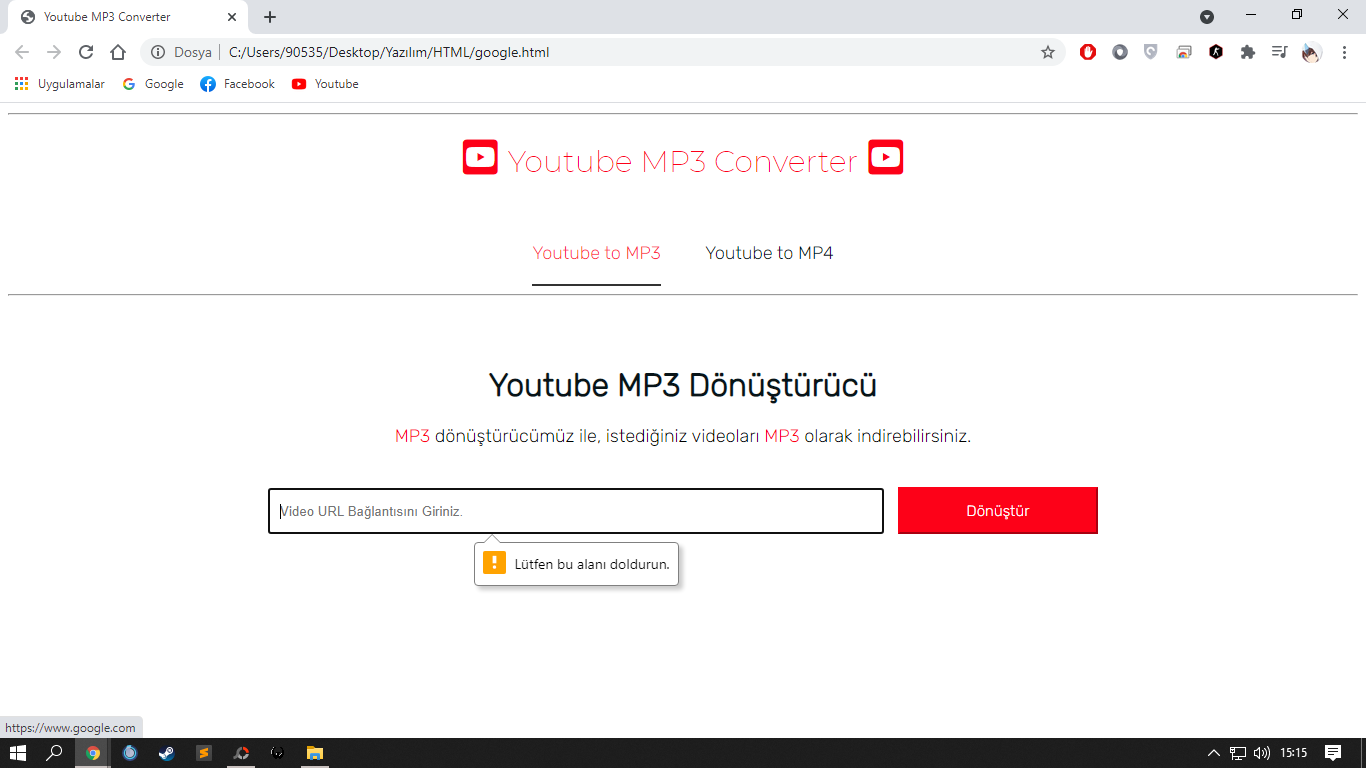
Örnek(özgün olmayan) basit web içeriğim:
Bilgisi olan var mı?
Örnek(özgün olmayan) basit web içeriğim:
HTML:
Kod:
<!DOCTYPE html>

<html lang="tr">

<head>

    <title>Youtube MP3 Converter</title>

    <link rel="stylesheet" type="text/css" href="https://www.webailesi.com/yonlendir.php?link=CSS%2Fgoogle.css">

    <link rel="stylesheet" href="https://www.webailesi.com/yonlendir.php?link=https%3A%2F%2Fuse.fontawesome.com%2Freleases%2Fv5.0.13%2Fcss%2Fall.css" integrity="sha384-DNOHZ68U8hZfKXOrtjWvjxusGo9WQnrNx2sqG0tfsghAvtVlRW3tvkXWZh58N9jp" crossorigin="anonymous">

    <link rel="preconnect" href="https://www.webailesi.com/yonlendir.php?link=https%3A%2F%2Ffonts.gstatic.com">

<link href="https://www.webailesi.com/yonlendir.php?link=https%3A%2F%2Ffonts.googleapis.com%2Fcss2%3Ffamily%3DMontserrat%3Awght%40200%26amp%3Bdisplay%3Dswap" rel="stylesheet">

<link rel="preconnect" href="https://www.webailesi.com/yonlendir.php?link=https%3A%2F%2Ffonts.gstatic.com">

<link href="https://www.webailesi.com/yonlendir.php?link=https%3A%2F%2Ffonts.googleapis.com%2Fcss2%3Ffamily%3DRubik%3Awght%40300%26amp%3Bdisplay%3Dswap" rel="stylesheet">

<link rel="preconnect" href="https://www.webailesi.com/yonlendir.php?link=https%3A%2F%2Ffonts.gstatic.com">

<link href="https://www.webailesi.com/yonlendir.php?link=https%3A%2F%2Ffonts.googleapis.com%2Fcss2%3Ffamily%3DBebas%2BNeue%26amp%3Bdisplay%3Dswap" rel="stylesheet">

    <meta charset="utf-8">

</head>

<body>

    <hr id="hr1">

    <div id="div1">

        <i id="yt" class="fab fa-youtube-square"></i>

        <a href="https://www.webailesi.com/yonlendir.php?link=https%3A%2F%2Fwww.google.com" id="site">Youtube MP3 Converter</a>

        <i id="yt" class="fab fa-youtube-square"></i>

    </div>

    <div id="div2">

        <a href="https://www.webailesi.com/yonlendir.php?link=https%3A%2F%2Fwww.google.com" id="div2mp3">Youtube to MP3</a>

        <a href="https://www.webailesi.com/yonlendir.php?link=https%3A%2F%2Fwww.google.com" id="div2mp4">Youtube to MP4</a>

    </div>

    <hr id="hr2">

    <div id="div3">

        <h1 id="h1mp3">Youtube MP3 Dönüştürücü</h1>

    </div>

    <div id="div4">

        <a href="https://www.webailesi.com/yonlendir.php?link=https%3A%2F%2Fwww.google.com" id="div4bilgi"><a href="https://www.webailesi.com/yonlendir.php?link=https%3A%2F%2Fwww.google.com" id="div4bilgired1">MP3</a> dönüştürücümüz ile, istediğiniz videoları <a href="https://www.webailesi.com/yonlendir.php?link=https%3A%2F%2Fwww.google.com" id="div4bilgired1">MP3</a> olarak indirebilirsiniz.</a>

    </div>

    <div id="div5">

        <form>

        <input id="input1" type="text" autofocus required placeholder="Video URL Bağlantısını Giriniz.">

        <input id="input2" type="submit" value="Dönüştür">

        </form>

    </div>

</body>

</html>Kod:
div#div1{

    font-size: 40px;

    color: #fd0118;

    text-align: center;

    margin-top: 20px;

}


a#site{

    text-decoration:none;

    color: #fd0118;

    font-family: 'Montserrat', sans-serif;

    font-size: 30px;

}


a#div2mp3{

    text-decoration: none;

    margin-right: 20px;

    color: #081418;

    font-family: 'Rubik', sans-serif;

    font-size: 18px;

    transition: 0.8s;

}


a#div2mp4{

    text-decoration: none;

    margin-left: 20px;

    color: #081418;

    font-family: 'Rubik', sans-serif;

    font-size: 18px;

    transition: 0.8s;

}


div#div2{

    text-align: center;

    margin-top: 60px;

}


a#div2mp3:hover{

    color: #fd0118;

    opacity: 0.8;

    border-bottom: 2px solid black;

    padding-bottom: 20px;

}


a#div2mp4:hover{

    color: #fd0118;

    opacity: 0.8;

    border-bottom: 2px solid black;

    padding-bottom: 20px;

}


h1#h1mp3{

    color: #081418;

    font-family: 'Rubik', sans-serif;

    margin-top: 70px;

    text-align: center;

}


hr#hr1{

    margin-top: 10px;

}


hr#hr2{

    margin-top: 30px;

}


div#div4{

    text-align: center;

    font-family: 'Rubik', sans-serif;

    font-size: 18px;

    text-decoration: none;

}


a#div4bilgi{

    color: #081418;

}


a#div4bilgired1{

    color: #fd0118;

    text-decoration: none;

    transition: 0.8s;

}


a#div4bilgired2{

    color: #fd0118;

    text-decoration: none;

    transition: 0.8s;

}


a#div4bilgired1:hover{

    opacity: 0.5;

}


a#div4bilgired2:hover{

    opacity: 0.5;

}


div#div5{

    margin-top: 30px;

}


#input1{

    width: 600px;

    height: 40px;

    margin-left: 260px;

    margin-top: 10px;

    padding-left: 10px;

}


#input2{

    width: 200px;

    height: 47px;

    margin-left: 10px;

    margin-top: 10px;

    font-size: 15px;

    background-color: #fd0118;

    border-color: #fd0118;

    color: white;

    font-family: 'Rubik', sans-serif;

    transition: 0.8s;

}


#input2:hover{

    background-color: white;

    border-color: black;

    color: black;

}