)




– Tema Açıklaması –
Mybb Arcobaleno Ücretsiz Teması 2021 De Mybb Dizayn Tarafından Yapıldı.Bu Güzel Sizlere Özel Ücretsiz! Mybb Dark Tema Arcobaleno 2021
 2- Arcobaleno Dark Form Teması ( TR - EN ).rar(Dosya Boyutu: 490,56 KB | İndirme Sayısı: 523)
- Yapımcısı : Mybb Dizayn
- Sürümü : Bilinmiyor
- Admin Paneli
- Temalar & Şablonlar
- Rardaki Xml Dosyasını Yükleyin.
- Ftp Upload Klasörünün İçindekileri’de Ftp Ana Dizine Yükleyin.
- Admin Panelinden Pluginlerden Arcobaleno Eklentisini Aktif Edin.
- Php Sürümü : 5.6 & Üstü
- Mybb Sürümü : 1.8.x
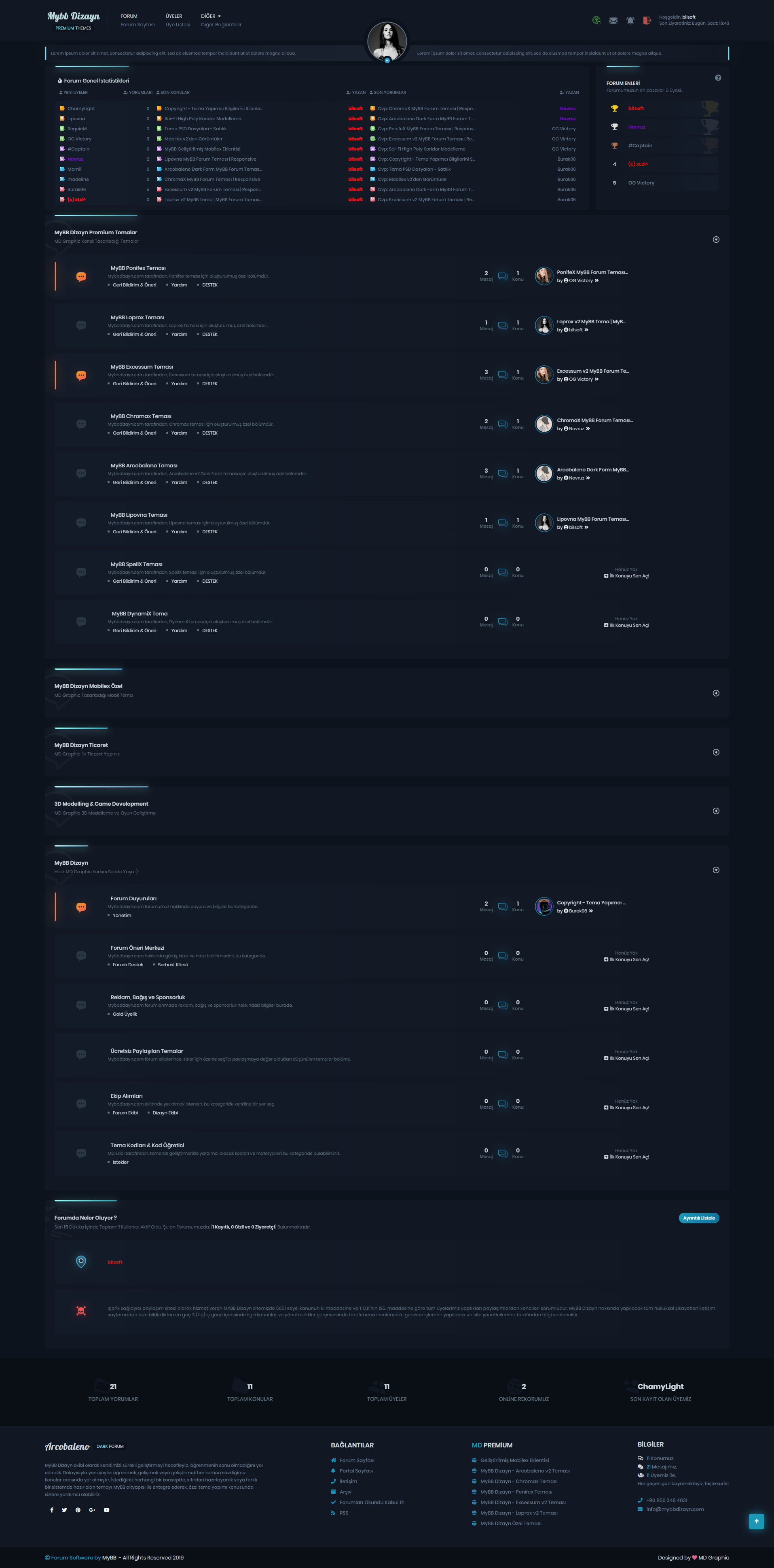
Tema Hakkında Görseller-
Mybb Nedir ?
MyBulletinBoard (MyBB) PHP kodlama dili ile yazılmış, MySQL veritabanı ile kullanılan eklentiler ile geliştirilebilen ücretsiz bir forum sistemidir. Chris Boulton ve ekibi tarafından kodlanarak kullanıma sunulan forum paketi, yapımcı grubun güvenlik ağırlıklı güncelleştirilen versiyonları ve gönüllü destekçilerin yaptıkları tema ve eklentilerle eksikliklerini büyük ölçüde tamamlamıştır. 1.6 versiyonu ile gelen geliştirme ve yeniliklerle forum sistemleri arasındaki yerini yükseltme gayretinde olan MyBB; Türkiye’de binlerce üyesi olan destek sitesi ile Türk internet kullanıcılarına MyBB’yi tanıtmakta ve hizmet vermektedir.
MyBB Kullanıcı paneli Özellikleri:
- Forum kullanım seçenekleri ve kontrolu
- Profile – imza – avatar ekleme ve düzenleme
- Özel mesaj kontrolu ve klasör oluşturma
- Konu aboneliği
- Arkadaş listesi oluşturma ve düzenleme
- Forum aboneliği
- Grup üyelikleri
- Kullanıcı not defteri
- Referans sistemi
- Mesajlara dosya ekleme ve oylama
- Mesajlarda MyCode-BBCode kullanma ve ifade ekleme
- E-mail ile yeni mesaj bildirimi alma
- Mesajlarda bir veya birden çok alıntı yapma, çoklu ve hızlı alıntı
- Hızlı cevap editörü
- Mesajların moderatörlere rapor edilmesi
- Konuların doğrusal ve normal görüntülenebilmesi
- Konuların yazdırılabilir format alternatifi
- Konu içinde arama yapabilme
- Yönetici panelinden kolay tema değiştirebilme
- Kullanıcı gruplarını yönetebilme
- Grup ve forum izinlerini hızlı düzenleyebilme
- Üye yönetimi, toplu e-posta ve özel mesaj gönderebilme
- Üye adına göre veya ip adresine göre üye yasaklama
- Kontrol paneli ile eklenti ve tema düzenleme, yükleyebilme
- Kontrol panelinden dil dosyalarını düzenleyebilme
- Versiyon Kontrolü yapabilme
- Moderatör ve yönetici kayıtları
- İfade, mycode ve ikon ekleyebilme
- Veritabanı yedekleme
- Duyuru ekleme ve kaldırma
- Kullanıcı profili düzenleme
- Kullanıcı yasaklama
- Uyarı kayıtları
- İp arama
- Moderatör notları
MyBB, diğer internet scriptlerinden çok farklı olmayan bir yol üzerinedir. Yukarıdaki adresten indirdiğiniz kurulum paketini (eğer .zip ya da diğer muhtelif sıkıştırma formatı ile indirdiyseniz arşivden çıkarmanız gerekmektedirFTP ile bağlandığınız sitenizin, forumu kurmak istediğiniz dizinine gönderin. Eğer doğrudan ana dizine kurulum yapmak istiyorsanız, çokça kullanılan cPanel’de bu dizin public_html olacaktır. Kopyalama işlemi bittikten sonra tarayıcı aracılığıyla kurulum işlemine başlamanız gerekmektedir.
MyBB dosyalarını attığınız dizinin sonuna /install ekleyerek kurulum sayfasına ulaşabilirsiniz. İlk aşamada sistemin geliştirilmesi adına sizden anonim olarak veri toplama izni istenecektir. Tercihin size bağlı olduğunu belirtelim. Ardından gelen lisans sözleşmesini ise kabul etmeniz gerekmektedir. Bir sonraki ekranda yazma izinleri ile ilgili herhangi bir problemin olup olmadığı görüntülenecektir. İzinler hususunda bir problem yoksa veritabanı ayarları kısmına ulaşmış olmalısınız. Bu aşamada sunucunuzun kullandığı yönetim paneline erişerek MySQL veritabanı oluşturmaya ihtiyacınız var. Veritabanı adı, kullanıcı adı, şifre ve oluşturulacak tablolarda kullanılmasını istediğiniz ön ekleri bu ekrandan girebilirsiniz. MyBB, oluşturmuş olduğunuz veritabanı ile bağlantıyı sağladığı takdirde tabloları yaratmaya başlayacaktır. Bundan sonraki aşamalarda da forum sisteminizin başlığı, yönetici e-postası gibi çeşitli gerekli bilgiler yer alacaktır. Bu aşamayı da geçtikten sonra MyBB kuruluma hazır hâle gelecek ve eklenti ya da tema desteği ile sistemi özelleştirebileceksiniz.
English –
About Mybb Arcobaleno Free Theme Theme:Mybb Arcobaleno Free Theme Made By Mybb Design In 2021. This Beautiful Special Free For You! Mybb Dark Theme Arcobaleno 2021
- Producer: Mybb Dizayn
- Version: Unknown
- Admin Panel
- Themes & Templates
- Upload the Xml File in the Rar.
- Upload to Ftp Master Directory in Contents of FTP Upload Folder.
- Activate Arcobaleno Plugin from Plugins in Admin Panel.
- Mybb Arcobaleno Free Requirements
- Php Version: 5.6 & Above
- Mybb Version: 1.8.x
My vBulletinBoard (MyBB) is a free forum system written in PHP coding language that can be developed with extensions used with MySQL database. The forum package, coded by Chris Boulton and his team, has largely complemented its deficiencies with the security-based updated versions of the producer group and the themes and plugins made by volunteer supporters. With the development and innovations coming with the 1.6 version, MyBB is trying to increase its place among the forum systems; With support site, which has thousands of members in Turkey has been introducing mybb’y and serves Turkish internet users.
MyBB User panel Features:
Forum usage options and control
Profile – signature – add and edit avatars
Private message check and folder creation
Subject subscription
Create and edit friends list
Forum subscription
Group memberships
User notebook
Reference system
MyBB Messaging and thread features:
Attaching files to posts and voting
Using MyCode-BBCode in messages and adding expressions
Receiving new message notifications by e-mail
One or more quotes in posts, multiple and quick quotes
Quick reply editor
Reporting messages to moderators
Linear and normal viewing of subjects
Printable format alternative of topics
Ability to search within the topic
MyBB Admin panel features:
Easy theme change from admin panel
Managing user groups
Ability to quickly edit group and forum permissions
Member management, sending mass e-mails and private messages
Members banning by name or ip address
Editing and uploading plugins and themes with the control panel
Ability to edit language files from the control panel
Ability to Control Version
Moderator and manager records
Adding emoticons, mycodes and icons
Database backup
MyBB Moderator panel features:
Add and remove announcements
Editing a user profile
User ban
Alert logs
Searching for a rope
Moderator notes
Mybb Setup
MyBB is on a way that is not much different from other internet scripts. If you have downloaded the installation package from the above address (if you have downloaded it with .zip or other various compression format, you need to extract it from the archive. Submit it to the directory where you want to install the forum on the site you are connecting with FTP. If you want to install directly to the main directory, this directory will be public_html in the widely used cPanel. After it is done, you need to start the installation process through the browser.
You can reach the setup page by adding / install to the end of the directory where you have added MyBB files. In the first stage, you will be asked to collect data anonymously in order to improve the system. Let us point out that the preference depends on you. You have to accept the license agreement that follows. The next screen will show if there are any problems with write permissions. If there is no problem with permissions, you should have accessed the database settings section. At this stage, you need to create a MySQL database by accessing the management panel used by your server. You can enter the database name, user name, password and prefixes you want to be used in the tables to be created from this screen. MyBB will start creating the tables if it provides the connection with the database you have created. In the next stages, various necessary information such as the title of your forum system, administrator e-mail will be included. After passing this stage, MyBB will be ready for installation and you will be able to customize the system with plug-in or theme support.

 MyBB Stabilizer Teması | Normalde Ücretli Ama Size Ücretsiz!